Leadership clarity
A current school picture that highlights priorities, patterns and exceptions without waiting for departmental reports.

For schools
AZHNI helps schools connect leadership, learning, people and operations — creating a stronger daily experience and school knowledge that lasts.
Why schools choose AZHNI
The platform is broad by design, but the goal is simple: less fragmentation, earlier action and more confidence in the school’s own information.
A current school picture that highlights priorities, patterns and exceptions without waiting for departmental reports.
Focused everyday workflows that reduce repeated administration and fit how teachers actually work.
Accurate, child-specific context delivered through a school-controlled experience.
Learning, progress, achievement and support needs seen together rather than in isolated records.
Admissions, fees, staff, transport and communication connected to accountable school processes.
School knowledge stays with the school — not individual spreadsheets, phones or staff memory.
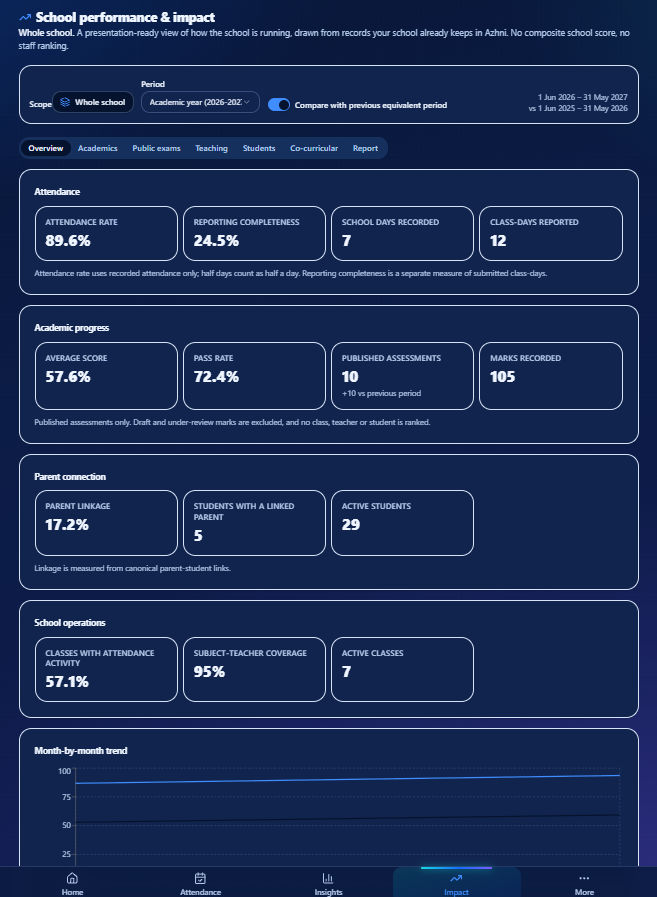
School performance & impact
Azhni brings attendance, published academic performance, learning activity, student support and operational readiness into one leadership view — helping principals understand where the school is progressing and where action is needed.
Scope the view to the whole school, a grade, or a single class — leadership sees aggregate, evidence-based trends.
Average score, pass rate, attendance rate and reporting completeness drawn only from published, entered records.
Coverage, linkage and activity signals show where the school is on track and where attention is needed.
Presentation-ready reports for authorised leadership — no class ranking, no student ranking, no opaque composite score.
Exam lifecycle & readiness
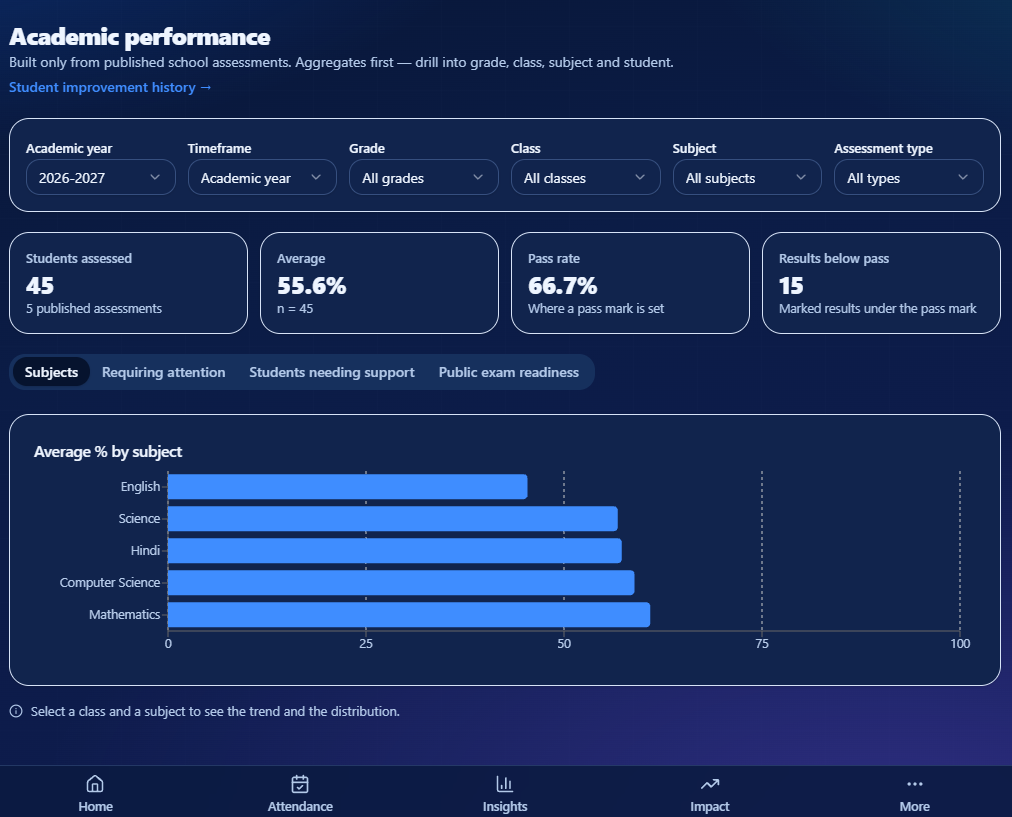
Azhni connects exam scheduling, portions, marks entry, review and publication into one controlled workflow — while school leaders can see what is ready, what is still in review and where action is needed.
Assessments are scheduled with portions and context — not as isolated records.
Teachers enter marks for the subjects they actually teach; class teachers review, publish or return for revision.
Every assessment carries an explicit lifecycle state, so nothing reaches families before the school's approved review.
Aggregate performance, pass rates and outstanding review states — drill into grade, class, subject and student.
For important exam cohorts, schools can track preparation and readiness more closely while keeping the same controlled assessment workflow.
Published results reach families only after the school's approved review workflow.
A better operating model
AZHNI respects existing responsibilities while giving every authorised team a clearer shared context.
Smart timetable & cover
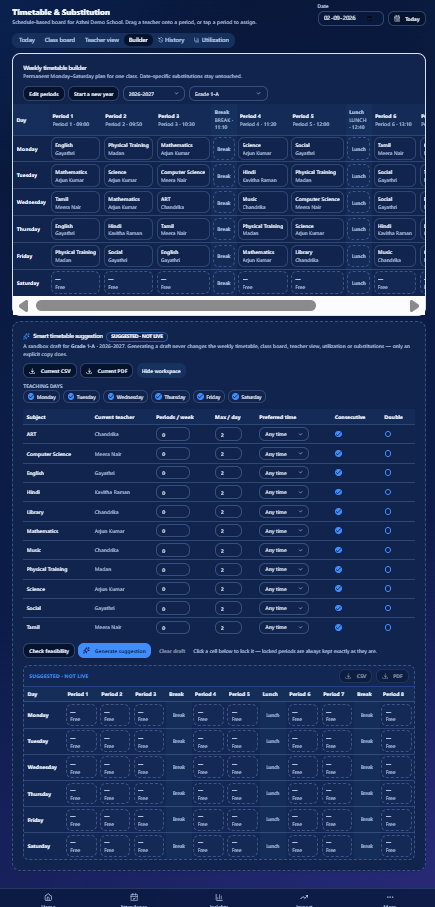
Azhni helps schools build and manage weekly timetables with teacher availability, conflict checks and substitution needs in view. Smart Suggestions stay separate from the live timetable until an administrator chooses to copy them.
Build the permanent Monday–Saturday plan per class with whole-school teacher conflicts checked as you assign.
A generated draft for the selected class and academic year is reviewed on its own board — never live until an administrator explicitly copies it.
When approved staff absence affects scheduled periods, Azhni highlights where cover is required so administrators can act from the same operational view.
Compare the suggested grid against existing periods, copy with explicit confirmation, and keep a recovery snapshot of the previous builder state.
Admins can review the generated grid, use it as a reference, or explicitly copy it into the Weekly Builder with safeguards.
The school stays in control of every timetable change. Class and timetable views can also be downloaded for operational use where enabled.
A guided rollout
Every school is introduced to AZHNI with support, a focused scope and a clear review before wider rollout.
Map the priorities, workflows and information gaps your school wants to improve.
Prepare the school workspace, academic structure and authorised people with support.
Bring agreed school records through a validated process with clear error reporting.
Run selected real workflows with a practical group of classes and teams.
Review leadership evidence, then expand in controlled stages across the school.
Daily adoption. Can staff complete the agreed workflows simply and consistently?
Connected value. Do families and leaders receive more useful context from the same activity?
Rollout confidence. What should expand next, and what support will make it successful?
A practical conversation about your school’s priorities, daily workflows and the value a connected platform could create.